Occupancy grids

See the C++ API documentation for: mrpt::slam::COccupancyGridMap2D (part of the library mrpt-maps)
Contents
1. Theoretical Bases
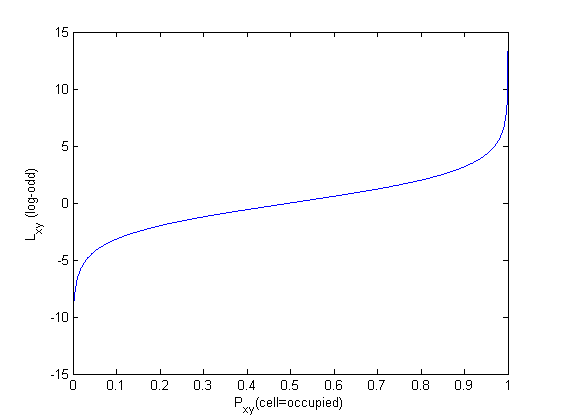
Log-odds method. (write me!)
2. An efficient implementation
2.1. Map representation
The log-odds theoretical method for Bayesian integration is implemented using a discretization to 8 bits per cell: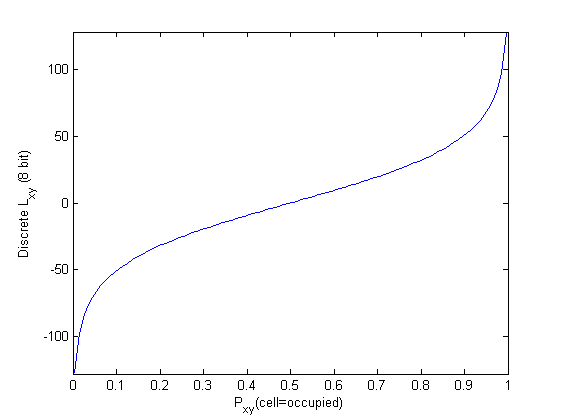
2.2. A benchmark
The next graphs summarize the performance of the most common operations on grid maps. The results have been generated by the program “samples/benchmarkGridmaps”, on a Intel Core 2 Duo 2.2Ghz, MRPT version 0.5.5, averaging over thousands of repetitions.
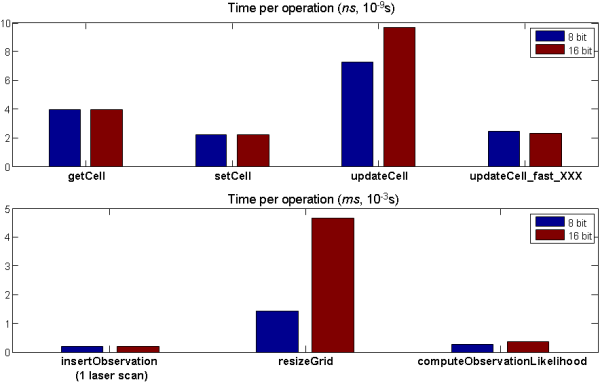
- Laser insertions per second: 5680 / 5160 (8 bit/ 16 bit).
- Likelihood computations per second: 3770 / 2810 (8 bit/ 16 bit), for method=LF_thrun, no decimation.
- These results are for a cell size of R=0.04m (4cm). Note most of the complex operations scale as O(1/R^2) .
- 8-bit and 16-bit representations have a very similar performance for all operations, but for resizing. This is an effect of a larger requirement of memory that leads to more cache memory misses.
- Unless your application requires really precise probability values for each grid cell, use 8-bit always.
- If several calls to updateCell are made from some method, replace them by calls to the updateCell_fast_XXX methods.
3. Implemented Sensor models (Observation likelihood models)
The selection of likelihood function is made through the member COccupancyGridMap2D::TLikelihoodOptions. Refer to the doxygen documentation for all the details. In the following only a basic description of each method is provided.
3.1. Beam model (lmRayTracing)
(write me!)
3.2. Likelihood Field (lmLikelihoodField_Thrun)
(write me!)
3.3. Consensus (lmConsensus)
(write me!)
4. Implemented Operations
(write me!)
4.1. Laser scan insertion
There are two main methods for inserting a laser scan in a gridmap: with and without widening the beams. To clarify the differences, see the next animation which compares both methods:

4.2. Observations likelihood
….
4.3. Save/Load/Conversions
….
4.4. Load from an image file
With COccupancyGridMap2D::loadFromBitmapFile the bitmap can be loaded from any image (png,bmp,etc.). You should specify the size in meters of one pixel, and optionally, the (x,y) coordinates of the map center (0,0 by default).
….
4.5. Save as image file
With COccupancyGridMap2D::saveMetricMapRepresentationToFile, two files will be generated (at least): one with an image representing the gridmap, and another text file with the (x,y) coordinates of its limits. In this way, it’s easy to import the gridmap in Matlab, for example.
….
4.6. Load/Save as a MRPT binary file
To load or save a gridmap to a binary file, use the MRPT standard CSerializable interface:
COccupancyGridMap2D gridmap;
CFileInputStream in_s("file.gridmap");
in_s >> gridmap;
CFileOutputStream out_s("another_file.gridmap");
out_s << gridmap;
4.7. Entropy
….
4.8. Voronoi
…